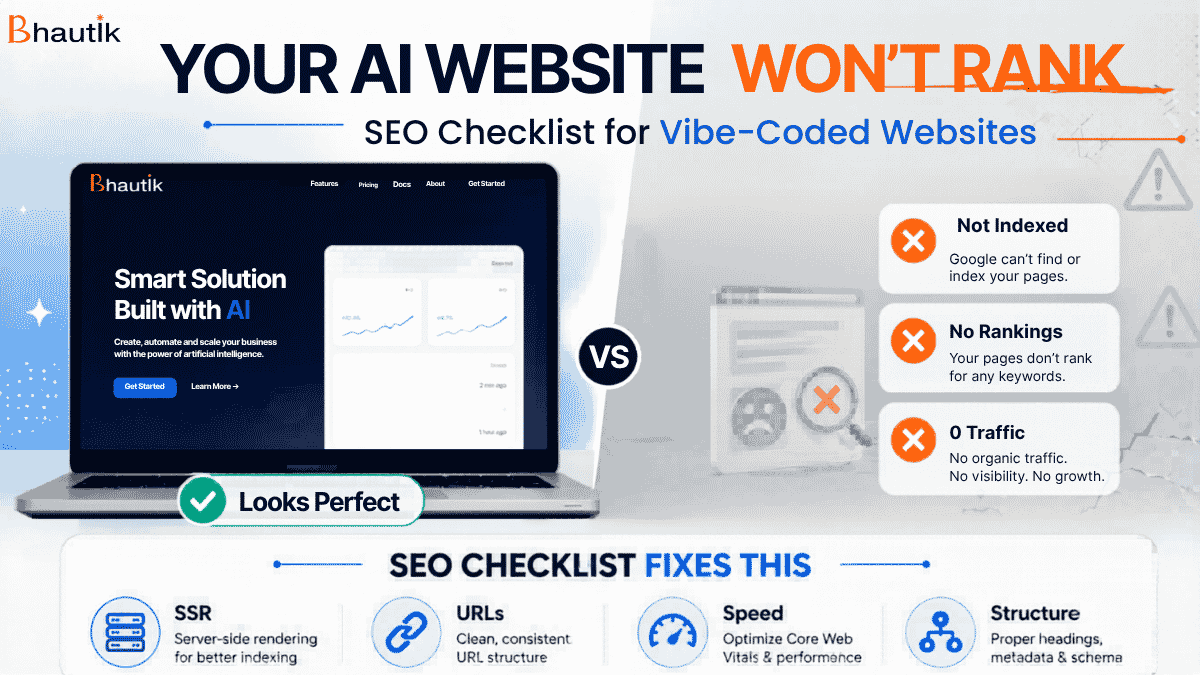

AI tools have made building websites ridiculously easy.
You can launch a full website using tools like Lovable, Cursor, or Vercel in just a few hours.
You launched your AI-built website. It looks stunning, with smooth animations, fluid design, and pixel-perfect layout. You’re proud of it.
Then three months pass.
Zero traffic. Zero rankings.
Your Google Search Console is throwing errors you’ve never seen before.
Here’s the truth: most vibe-coded websites are SEO disasters waiting to happen, not because the design is bad, but because the platforms that build them don’t care about Google.
They care about making your site look good fast. SEO is your problem, not theirs.
This guide covers the 10 SEO rules every business owner with an AI-generated or vibe-coded website needs to follow, along with what happens if you ignore them. Whether you’ve built with Lovable, Cursor, Vercel, Replit, or any other AI builder, these rules apply directly to you.
Why Vibe-Coded Websites Struggle With SEO?
Before the checklist, you need to understand the root cause.
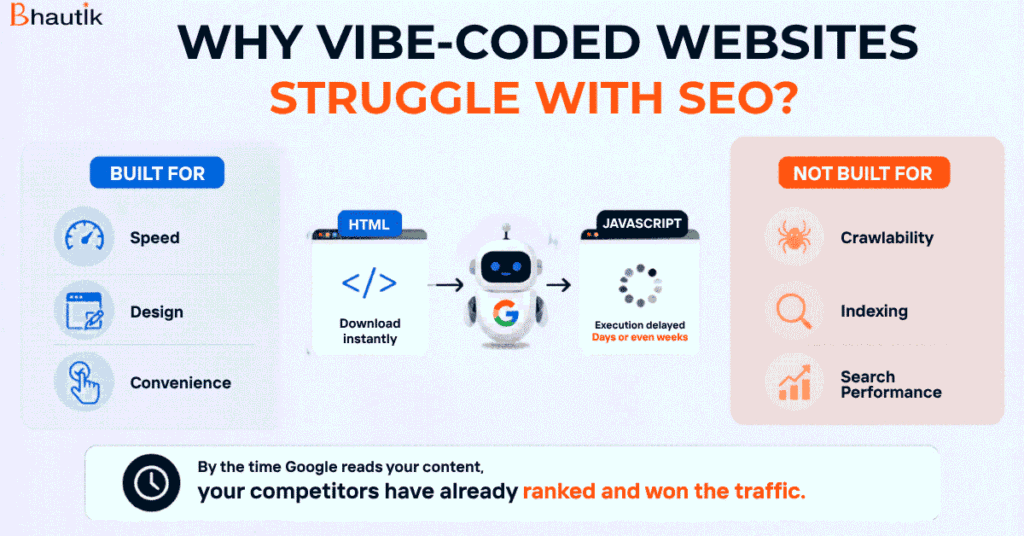
AI website builders are built for speed and visual output. They use JavaScript heavily to create those smooth, modern interfaces. That’s fine for design. But Google doesn’t treat JavaScript the same way it treats HTML, and that’s where the real problem starts.
They are built for:
- Speed
- Design
- Convenience
Not for:
- Crawlability
- Indexing
- Search performance
When Googlebot visits your website, it downloads your HTML instantly. But JavaScript? Google can take days or even weeks to execute it. If your entire site’s content lives inside JavaScript (which is the default in most vibe-coded platforms), Googlebot sees a completely blank page on its first visit.
By the time Google comes back to execute the JavaScript and actually read your content, your competitors have already indexed, ranked, and taken the traffic you were expecting.
That’s just problem number one. There are nine more.
The 10-Point AI SEO Checklist for AI-Built Websites
Let’s break this down into actionable steps.
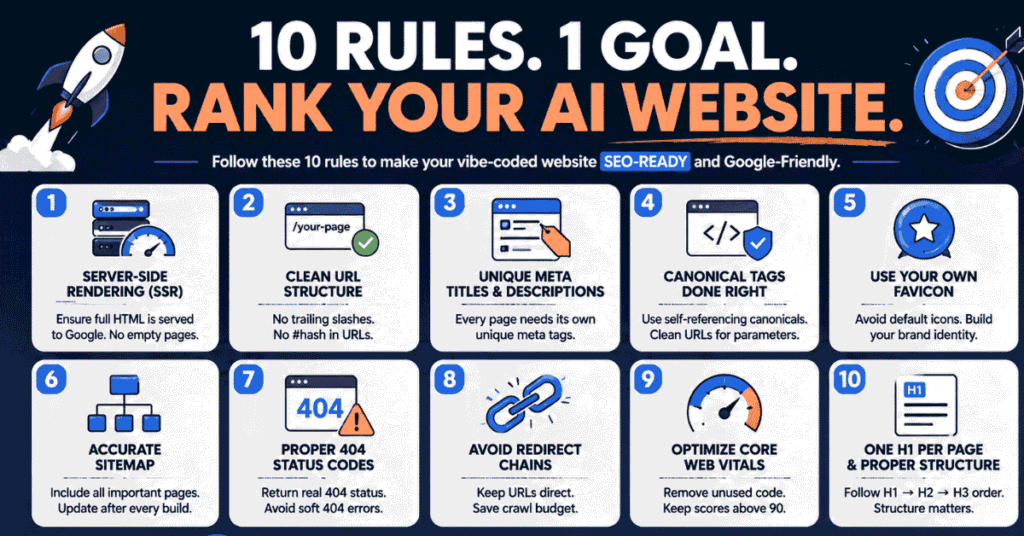
1. Switch to Server-Side Rendering (SSR)
This is the most important fix you can make, and it needs to happen before anything else.
Client-side rendering means your content is assembled in the browser using JavaScript. Server-side rendering means your server pre-builds the complete HTML page before sending it to any visitor, including Googlebot.
When SSR is enabled, Googlebot arrives at your page and immediately sees fully rendered HTML with all your content already loaded. No waiting. No delays. No empty pages.
What to do: When building or prompting your AI platform, explicitly instruct it to use server-side rendering. Next. JS-based platforms, this means using getServerSideProps or ensuring SSR is configured. In Vercel deployments, this is configurable at the framework level.
What happens if you ignore it: Google treats your site as empty. Indexing delays of weeks. Rankings that never come, even with perfect content.
Rule 2: Fix Your URL Structure
AI builders don’t think about URL structure because they don’t have to worry about users seeing the final page, regardless of the URL. But Googlebot does care, and so does your SEO.
There are three specific URL problems common in vibe-coded sites:
Inconsistent trailing slashes. Some URLs end with / and some don’t. Google treats yoursite.com/about and yoursite.com/about/ as two different pages. That creates duplicate content and splits your ranking signals.
Hash (#) symbols in URLs. Many JavaScript frameworks use the # character in URLs for navigation (also called hash routing). The problem is that Google stops reading a URL the moment it sees a #. Everything after it is invisible to Googlebot. Your pages simply don’t get crawled.
Random or flat URL structures. AI builders often generate URLs like /page-3a7k or /component-home with no logical hierarchy. These have zero SEO value and confuse both users and Google.
What to do: Define your URL structure before you build. Use clean, descriptive, keyword-relevant URLs. No trailing slashes. No hash symbols. Consistent across every page.
Rule 3: Write Unique Meta Titles and Descriptions for Every Page
JavaScript platforms often pull meta titles and descriptions from a single root configuration and apply them site-wide. This means your home page, about page, services page, and blog posts all share the same title tag and meta description.
That’s a significant SEO problem. Google uses meta titles as one of the strongest relevance signals. If every page on your site has the same title, Google has no way to understand what each page is about and won’t rank any of them well.
What to do: Ensure every page has its own unique meta title (50–60 characters) and unique meta description (150–160 characters) that accurately reflects that page’s content and target keyword. Verify this by viewing the page source (Ctrl+U) and searching for <title> and <meta name= “description”.
What happens if you ignore it: Duplicate meta issues flagged in Google Search Console, poor click-through rates, and significantly weaker rankings across your entire site.
Rule 4: Add Canonical Tags to Every Page
A canonical tag tells Google which version of a page is the “official” one. It prevents duplicate content issues when the same content is accessible from multiple URLs.
For most pages on your vibe-coded site, you want a self-referencing canonical tag, meaning the page points to itself as the authoritative version.
But here’s the nuance that most AI builders miss: if your site has URLs with query parameters (like yoursite.com/products?sort=price or yoursite.com/page?ref=ad), those pages should NOT use self-referencing canonicals. Instead, they should point to the clean URL version (yoursite.com/products) as their canonical.
If you add a blanket “self-referencing canonical for all pages” rule without this exception, every query parameter URL becomes its own canonical, and you’ve created a duplicate content problem instead of solving one.
What to do: Add self-referencing canonical tags to all clean URLs. For any URL with query parameters, set the canonical to point to the clean version of that URL.
Rule 5: Replace the Default Platform Favicon
This one sounds minor. It’s not.
Most vibe-coded platforms, Vercel, Next. JS-based builders, and Replit automatically inserts its own favicon (the small icon that appears in browser tabs). So your business website ends up showing a Vercel triangle or a Next.js logo instead of your brand.
This matters beyond just branding. Google’s systems are sophisticated enough to recognise patterns of AI-built sites. A default platform favicon is a signal that a human didn’t build or properly configure this site. It’s a subtle red flag that works against your authority.
What to do: Upload your own brand logo or icon as the favicon. It should be a square image, ideally 32×32 or 64×64 pixels, in .ico or .png format. Set this in your site’s <head> section.
Rule 6: Make Sure Your Sitemap Is Accurate and Complete
AI builders typically generate a sitemap automatically, but the problem is that they do so at build time. Any pages added dynamically after that (e.g., database-driven pages, blog posts, product listings) often don’t make it into the sitemap.
An incomplete sitemap means Google doesn’t know those pages exist. It may eventually find them through internal links, but that can take significantly longer. You’re leaving indexing speed on the table.
What to do: Ensure your sitemap generation runs after all pages are built and live. Your sitemap should include every unique, clean URL on your site and exclude any query-parameter versions of those URLs. Submit your sitemap to Google Search Console and inspect it regularly for missing pages.
What happens if you ignore it: Newly published pages take weeks to get indexed instead of days. Google can’t efficiently crawl your site structure.
Rule 7: Your 404 Page Must Return a 404 Status Code
This one is surprisingly common and surprisingly damaging.
AI builders can create beautiful, animated, interactive, and even funny 404 pages. But here’s the issue: visually showing a “404 Not Found” design means nothing to Google if the server is still returning a 200 OK status code.
When a missing page returns a 200 status, Google treats it as live content. It crawls it, tries to index it, and eventually flags it as a “Soft 404” error in Google Search Console. You end up with hundreds of phantom pages that clutter your crawl budget and pollute your index.
What to do: Check your 404 page’s HTTP status using a tool like httpstatus.io. Confirm it returns 404 (or 410 Gone for permanently deleted pages). This is a server configuration setting that works with your platform or developer to ensure it’s set correctly.
Rule 8: Eliminate Redirect Chains
Here’s how redirect chains happen on vibe-coded sites: you build a page at /services, then ask your AI builder to rename it to /our-services. The platform conveniently redirects the old URL to the new one. Then you rename it again to /seo-services. Another redirect gets added. Now you have a chain: /services → /our-services → /seo-services.
Every redirect in that chain adds crawl depth. For a large site, redirect chains waste your crawl budget, the limited capacity Google allocates to crawling your site. Pages at the end of long chains often don’t get crawled at all.
What to do: Audit your site for redirect chains using tools like Screaming Frog or AHREFS. Keep all redirects direct (A goes straight to C, not A to B to C). When you rename or move pages, always update internal links to point directly to the final URL.
Rule 9: Optimize Your Core Web Vitals Score
AI website builders are not building for performance. They’re building for visual impact. To create those smooth animations and polished designs, they import dozens of JavaScript libraries and CSS frameworks, many of which your final site doesn’t even use.
All that unused code sits on your pages, slowing down load times and destroying your Core Web Vitals scores. LCP (Largest Contentful Paint), CLS (Cumulative Layout Shift), FID/INP, these are Google ranking signals. A score below 50 is a real problem.
What to do: Run your site through Google PageSpeed Insights (pagespeed.web.dev). Identify unused JavaScript and CSS in the “Opportunities” section. Remove unused libraries and defer non-critical scripts. Aim for a score above 90 on both mobile and desktop.
What happens if you ignore it: Slower rankings, higher bounce rates, and a technical disadvantage against competitors whose sites load faster.
Rule 10: One H1 Tag Per Page – In the Right Order
AI builders use heading tags (H1, H2, H3) as design tools, not SEO tools. If a page needs four large headings, the platform might make all four H1 tags. From a design standpoint, it doesn’t matter. From an SEO standpoint, it signals to Google that your page has no clear primary topic.
Every page should have exactly one H1 tag, your main keyword-optimised page heading. After that, H2 for major sections, H3 for subsections within those sections. The hierarchy should flow logically: H1 → H2 → H3. Not H3 before H2. Not H2 before H1.
What to do: Audit your pages using a browser extension like Detailed SEO Extension or Web Developer toolbar. View the heading structure for each page. Fix any pages with multiple H1s or broken heading hierarchy.
The Bonus Rule: Human-Written Content Is Non-Negotiable
You can follow all 10 rules above perfectly and still not rank if your content is purely AI-generated.
AI-designed websites are completely fine; you’re building a visual structure, a layout, a user experience. But the content that lives inside that structure needs to be written, edited, and verified by humans.
Google’s algorithms are increasingly good at identifying thin, AI-generated content that doesn’t demonstrate genuine expertise or original insight. Even if your on-page SEO is flawless, purely AI-generated content will struggle to rank, especially in competitive niches.
If you use AI tools to draft content (which is fine), treat it as a first draft. A human needs to add real-world context, personal experience, accurate data, and clear expertise before it goes live.
The SEO Checklist: Quick Reference
| No | SEO Area | What to Do |
| 1 | Rendering | Use Server-Side Rendering (SSR) |
| 2 | URL Structure | Clean URLs — no trailing slashes, no # symbols |
| 3 | Meta Tags | Unique title + description per page |
| 4 | Canonical Tags | Self-referencing for clean URLs; clean URL canonical for query parameter pages |
| 5 | Favicon | Use your brand favicon, not the platform default |
| 6 | Sitemap | Generate after all pages are live; include all clean URLs |
| 7 | 404 Pages | must return the HTTP 404 status code, not 200 |
| 8 | Redirects | No redirect chains, keep all URLs direct |
| 9 | Core Web Vitals | Remove unused JS/CSS; score above 90 |
| 10 | Heading Structure | One H1 per page; correct H1 → H2 → H3 sequence |
Final Thoughts
Building with AI tools is smart. It saves time, cuts costs, and lets you launch faster than ever.
But launching fast means nothing if Google can’t index your site. A beautiful website that nobody finds isn’t an asset; it’s an expensive brochure.
The good news is that these 10 fixes are all implementation decisions. You don’t need to rebuild your site. You need to configure it correctly, audit it systematically, and ensure the technical foundations are solid before you invest time and money in content and link building.
Traffic is useless if it doesn’t convert, but you can’t even get there if Google can’t see your site.
If you’ve built an AI website and you’re not seeing rankings, or you’re not sure where to start fixing these issues, the right next step is to get a structured SEO audit and growth plan built around your specific setup.
Book a consultation to audit your vibe-coded website and build a system that actually generates organic traffic and leads.
FAQs
1. Do AI-built websites rank on Google?
Yes, but only if SEO fundamentals are properly implemented.
2. Is client-side rendering bad for SEO?
It can delay indexing because Google takes time to process JavaScript.
3. What is the biggest SEO mistake in AI websites?
Using client-side rendering without proper HTML content.
4. Can AI tools handle SEO automatically?
No. They help build websites, not optimise them for search engines.