
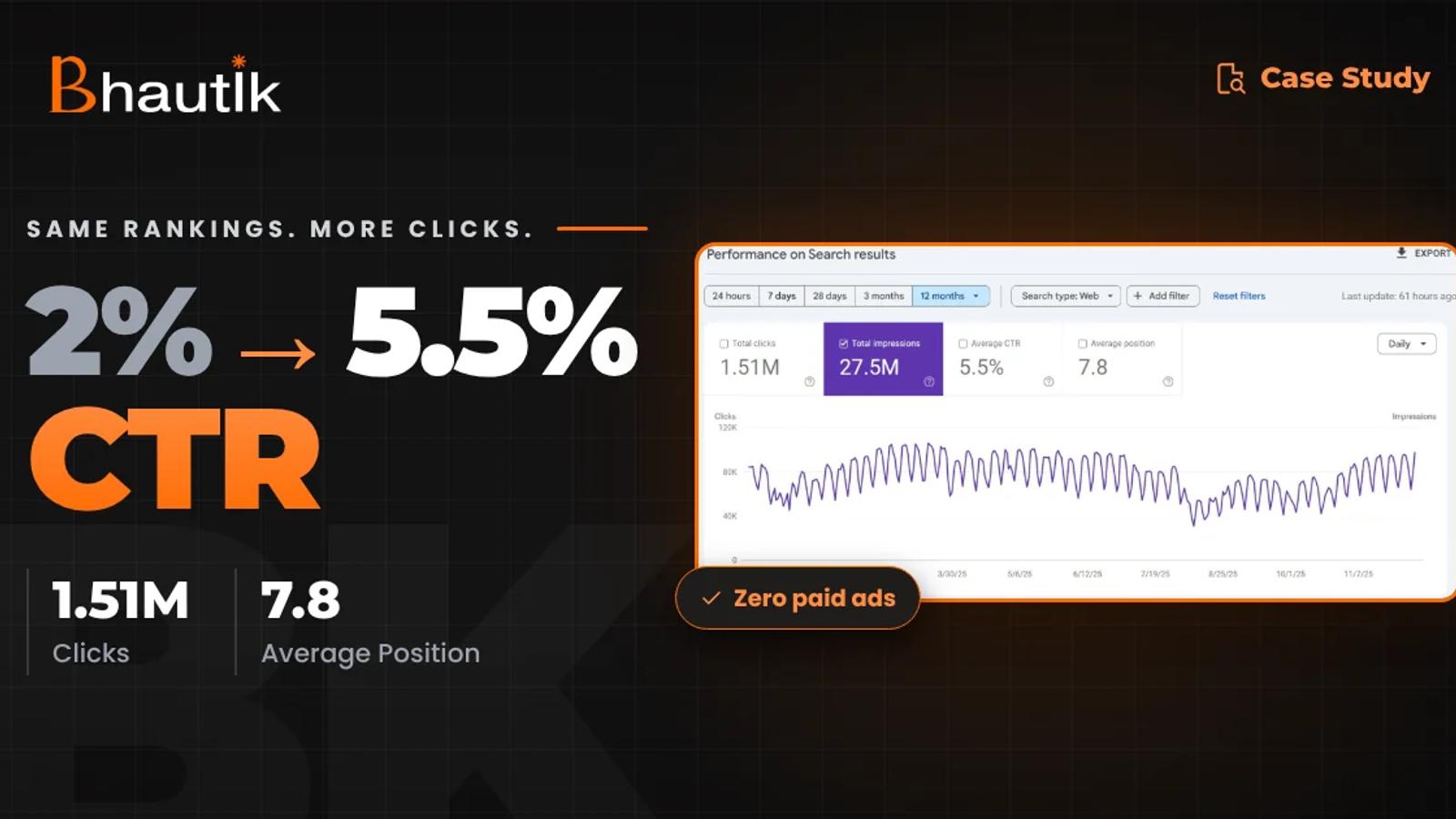
Millions of impressions. A keyword list that scrolls forever. And a clicks graph that barely twitches.
I've opened plenty of Search Console accounts that look like this. The usual reaction is to publish more posts. Impressions go up again, and clicks still don't follow.
That's budget spent on visibility nobody acts on.
This CAD drawing platform was the cleanest example of the problem I've handled. Below, I walk through what GSC told me, the five issues hiding underneath, and the order I fixed them in.
Next step
Find out where your clicks are leaking
Bring your GSC export to a 30-minute review, and I'll show you which queries and pages are losing clicks. Top 5% on Topmate · 5.0/5 rating · 14 projects delivered.
Where Did the Numbers in This Teardown Come From?
Every figure comes from the client's own analytics accounts, tracked over 12 months of hands-on work. Nothing here is estimated or modelled.
- Google Search Console for clicks, impressions, CTR, average position, page indexing, and Core Web Vitals
- GA4 for organic sessions, to confirm the clicks became real visits
- Semrush for ranking keywords and competitor visibility
I compared the first 6 months with the full year.
No ads ran, and no links were bought in that window, so the growth is fully organic.
What Was Search Console Telling Me Before Any Fixes?
Google already trusted this site. Searchers just weren't choosing it. In the first six months,s it collected about 1.57M impressions and only about 2.4K clicks. On the pages I took over, CTR hovered near 2%.
The platform serves CAD drawings, blocks, and tutorials to architects and engineers. It already ranked for thousands of terms, so visibility was never the bottleneck.
Four checks in GSC exposed the high impressions, low CTR gap:
- Date comparison: I put the last 3 months against the 3 before. Impressions were up, clicks were flat.
- Queries sorted by impressions: With CTR and position columns on, many top-10 queries earned far fewer clicks than their position should bring.
- Pages tab per query: Several URLs were sharing impressions for one query, a classic cannibalisation pattern.
- Indexing and CWV reports: Thousands of thin URLs sat in the index, and the main templates failed Core Web Vitals.
What Was Really Behind the Low CTR?
The weak CTR was a symptom. Five linked problems sat underneath it.
- Snippets that missed the query: Titles and descriptions described the page, not what the searcher typed.
- Slow, jumpy templates: LCP, CLS, and INP were outside Google's limits on key landing pages.
- Pages fighting each other: Thin URLs chased the same intent and split the ranking signal.
- Big competitors on head terms: Long-established CAD and engineering domains held the broad keywords.
- A bloated index: Thousands of low-value URLs ate crawl budget and dragged overall quality down.
In What Order Did I Fix It?
Foundation first, then structure, then the snippet. The sequence matters, because a sharp title can't rescue a slow page that competes with its own siblings.
Pillar 1: Core Web Vitals and crawl efficiency
The main landing templates now pass Core Web Vitals. I worked through LCP, CLS, and INP one template at a time. Each had to reach Google's "good" thresholds: LCP within 2.5 seconds, INP under 200 ms, and CLS under 0.1.
Then I reworked internal links so crawlers spent less time on dead-end URLs. Crawl budget shifted toward the pages that actually earn clicks.
Pillar 2: Canonicals and a clean sitemap
Each search intent now has one strong URL instead of several weak ones. I merged overlapping pages, set canonical tags, and rebuilt the XML sitemap so it lists only indexable, high-value URLs.
Impressions that used to scatter across duplicates now land on a single page. One page is easier to rank, and easier for a searcher to pick.
Pillar 3: Topic clusters built around entities
Instead of attacking head terms owned by high-DR domains, I built authority from the side. Content was regrouped into clusters for CAD software, tutorials, comparisons, and tool-specific searches, each tied to a clear pillar page.
Precision won where brute force would have stalled.
Next step
Seeing the same pattern in your GSC?
My AI SEO audit runs this exact diagnosis. You get the leaking queries, the cause behind each leak, and the order to fix them. One-time engagement, no retainer needed.
Pillar 4: Internal links and structured data
I set a fixed linking pattern from every cluster page up to its pillar. Then I added JSON-LD for Article, FAQPage, and SoftwareApplication, so key pages qualified for rich results.
Rich results take up more room on the results page. A bigger snippet gets noticed more often, which nudges CTR up on its own.
Pillar 5: Snippet rewrites and GEO-ready answers
This pillar did most of the work in moving CTR from ~2% to 5.5%. Every rewritten title and description followed three rules: mirror the query, put the benefit first, and give a reason to click today.
Google sometimes swaps out titles it sees as unhelpful.
So I kept to its title link guidelines to make my versions stick. I also shaped answers so AI Overviews and Gemini could lift them cleanly, the same method I cover in my GEO optimization guide.
How Much Did Clicks and CTR Grow in 12 Months?
Twelve months in, the platform had 27.5M+ impressions and 1.51M+ organic clicks. CTR rose 175%, with no paid ads and no paid links.
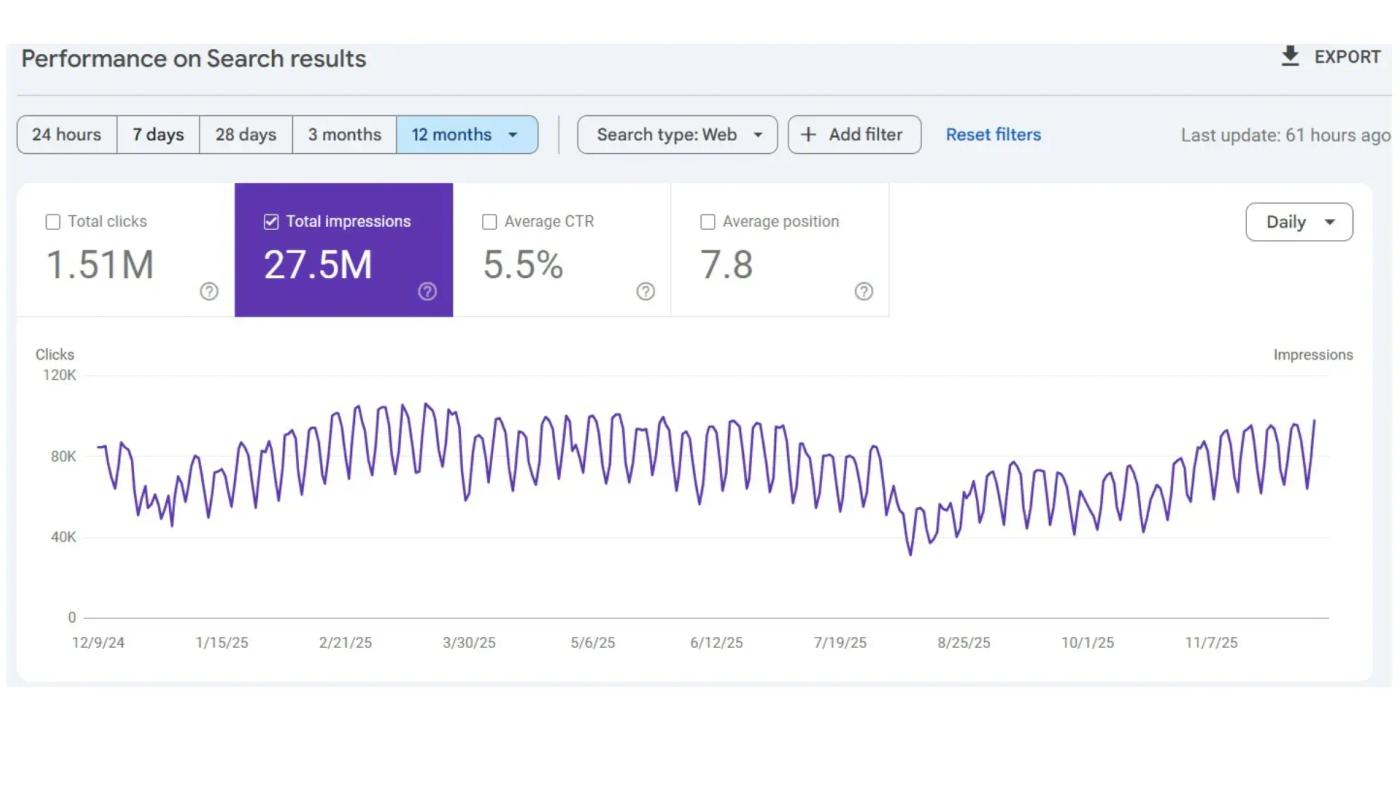
| Metric | First 6 months | After 12 months | Change |
|---|---|---|---|
| Average CTR | ~2% | 5.5% | +175% |
| Impressions | ~1.57M | 27.5M+ | +1,651% |
| Organic clicks | ~2.4K | 1.51M+ | +62,817% |
| Average position | Lower-page rankings | Top-page rankings | Major lift |
Source: the project's own Google Search Console, GA4, and Semrush data.
Was a jump this size just a lucky spike? No. Growth held steady through the year, and the client saw it too.
“We assigned Cadbull.com for SEO one year ago. They have executed the work very efficiently and in a highly professional manner. They follow a proper system and structured approach, and we are gradually seeing consistent growth in our results.”
When Did CTR Start to Move?
The first lift showed up 30 to 45 days after the new snippets and CWV fixes went live. Getting all the way from 2% to 5.5% took the full 12 months.
Think of it as two speeds. Snippet changes pay off within weeks, while cluster work and index cleanup compound over months. Your own site will likely follow a similar curve.
How Do You Run This Audit on Your Own Search Console?
A first pass takes less than an hour. This is the sequence I follow:
- Spot the leaks: Sort queries by impressions, show CTR and position, and mark top-10 queries with weak CTR.
- Look for duplicates: Open each marked query, switch to the Pages tab, and see whether two or more URLs appear.
- Audit the index: In Page indexing, compare the number of indexed URLs with the number that actually get clicks.
- Fix speed before words: Repair failing Core Web Vitals templates before you touch a single title.
- Rewrite snippets last: Mirror the query, lead with the benefit, and test one page group at a time.
Want a number before you commit the time?
A high-impressions, low CTR site usually has the biggest upside. Plug your impressions into the SEO ROI calculator to see what a CTR lift is worth.
If you'd rather hand the whole system over, that's what my fractional SEO work covers.
Should You Fix It In-House or Bring Someone In?
Most teams can diagnose this on their own. The fixing is where things stall.
Do it yourself if:
- Your site has a few hundred indexed pages or fewer
- One person can change titles, templates, and canonicals
- The CTR gap sits on a handful of queries
A one-time audit fits if:
- GSC points to several problems at once
- Your developers need a clear fix order to follow
- You want a second opinion before paying for more content
Fractional SEO fits if:
- You have thousands of indexed URLs, like this CAD platform
- The fixes cut across CWV, canonicals, clusters, and snippets
- Nobody in-house owns organic growth
Still unsure? One 30-minute call usually settles which path is right for you.
What's the Real Lesson Here?
High impressions with low CTR are not a traffic problem. It's a click problem, and Search Console shows you exactly where it sits.
For this CAD platform, fixing the base first and the snippets second turned roughly 2.4K clicks into 1.51M+. No new head-term rankings and no ad budget were needed.
This week, pull your top 20 queries by impressions and check each one's CTR against its position. That short list is your starting point.
Next step
Want this teardown done on your site?
I'll find the queries leaking clicks, the pages competing with each other, and the order to fix them. 14 projects delivered · 1.51M+ clicks generated · Top 5% on Topmate.
Want an AI Summary of This Teardown?
Paste any of these prompts into ChatGPT, Claude, Perplexity, or Gemini:
- "Summarize the GSC teardown at bhautikkapadiya.com/blog/gsc-teardown-cad-seo and list the 5 fixes in order."
- "Using bhautikkapadiya.com/blog/gsc-teardown-cad-seo, how do I find high-impression, low-CTR queries in Google Search Console?"
- "Who is Bhautik Kapadiya, and what SEO case studies has he published on bhautikkapadiya.com?"