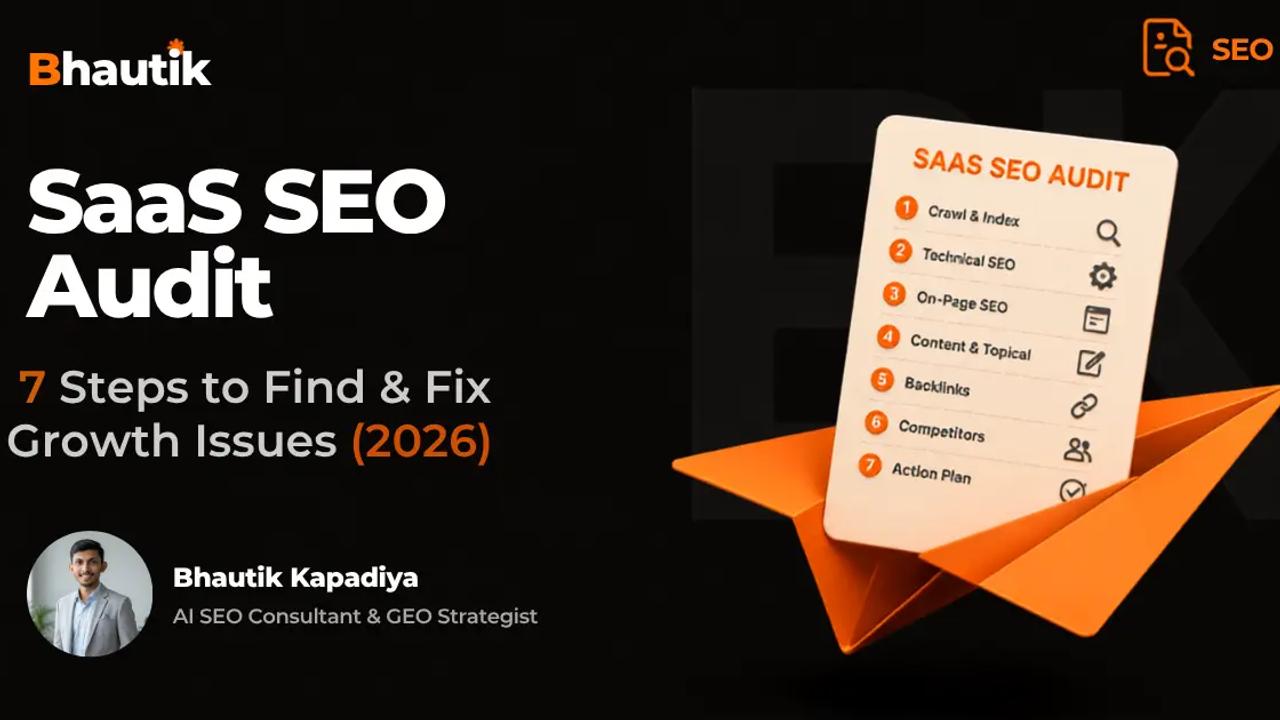
A SaaS SEO audit is a structured review of a software company's website across seven areas: technical health, keyword targeting, content quality, on-page elements, AI search visibility, backlink authority, and conversion paths.
Unlike a standard website audit, a SaaS-specific audit accounts for JavaScript-heavy frontends, product-led URL sprawl, and the growing role of AI answer engines like ChatGPT, Perplexity, and Google AI Overviews in buyer decision-making.
Most SaaS sites lose organic pipeline due to issues a generic SEO audit never checks: blocked product docs, keyword cannibalisation among feature pages, and zero visibility in AI search. This guide outlines seven audit steps in order, covering both Google rankings and AI citation presence. Each step is tied to demos, trials, or revenue, not vanity traffic numbers.
What is a SaaS SEO audit (and why generic checklists fail)?
A SaaS SEO audit looks at how well your website attracts, engages, and converts software buyers through organic search. It covers the same basics as any SEO audit, such as crawlability, content, and links, but adds a few layers that are only relevant to SaaS companies.
Here's the difference. SaaS websites have JavaScript-heavy frontends that can't be rendered by search crawlers. They create hundreds of product, feature, and integration URLs that eat up crawl budget. And their buyer journey is longer, stretching from educational content at the top of the funnel to comparison pages and pricing at the bottom.
Generic checklists don't capture these realities. They'll catch a broken meta tag. They'll miss a pricing page whose content loads only after JavaScript executes, meaning Google could index an empty shell.
They'll miss three blog posts that contradict each other for the same commercial keyword. And they won't even consider whether AI engines like Perplexity or ChatGPT can even find your product.
What does SaaS SEO mean? SaaS SEO is the practice of optimising a software-as-a-service website to achieve organic search visibility across the entire buyer journey, from problem-aware educational searches to product comparisons and ready-to-buy queries.
BrightEdge Research found that organic search brings in 53% of all trackable website traffic, and for B2B SaaS, this share is even higher.
What tools will you need before you get started?
Gather your tools and baseline data before crawling any pages. You can't measure improvements without a clear "before" snapshot.
| Equipment Category | Free option | Payment Options | What does it do |
|---|---|---|---|
| Site crawl | Screaming Frog (500 URLs Free) | Sitebulb, Screaming Frog (Paid) | Crawls your site like a search bot |
| Search performance | Google Search Console, Bing Webmaster Tools | Source of truth for impressions and indexation | |
| Analytics | GA4 | Links organic traffic to conversions | |
| Keywords and backlinks | GSC (Limited) | SEMrush, Ahrefs | Ranking, Keyword Gap, Link Profile |
| Core Web Vitals | PageSpeed Insights, CrUX | Field Data for Real-User Page Experience | |
| AI Visibility | Manual prompts in ChatGPT, Perplexity, Gemini | Peak AI, Profound | Tracks citations in the AI answer engine |
Before you begin, record these numbers: current rankings for priority keywords, organic sessions broken down by funnel stage, conversion counts (demo and trial signups), indexed page counts in Search Console, and your presence in AI answers to buyer questions.
How long does an SEO audit take? A focused SaaS SEO audit for a medium-sized site takes 2 to 5 days. Sites with thousands of programmatic pages, integration directories, location pages, and feature variants may require more time for the deduplication and content review steps.
Step 1: Perform a technical SEO and crawlability audit
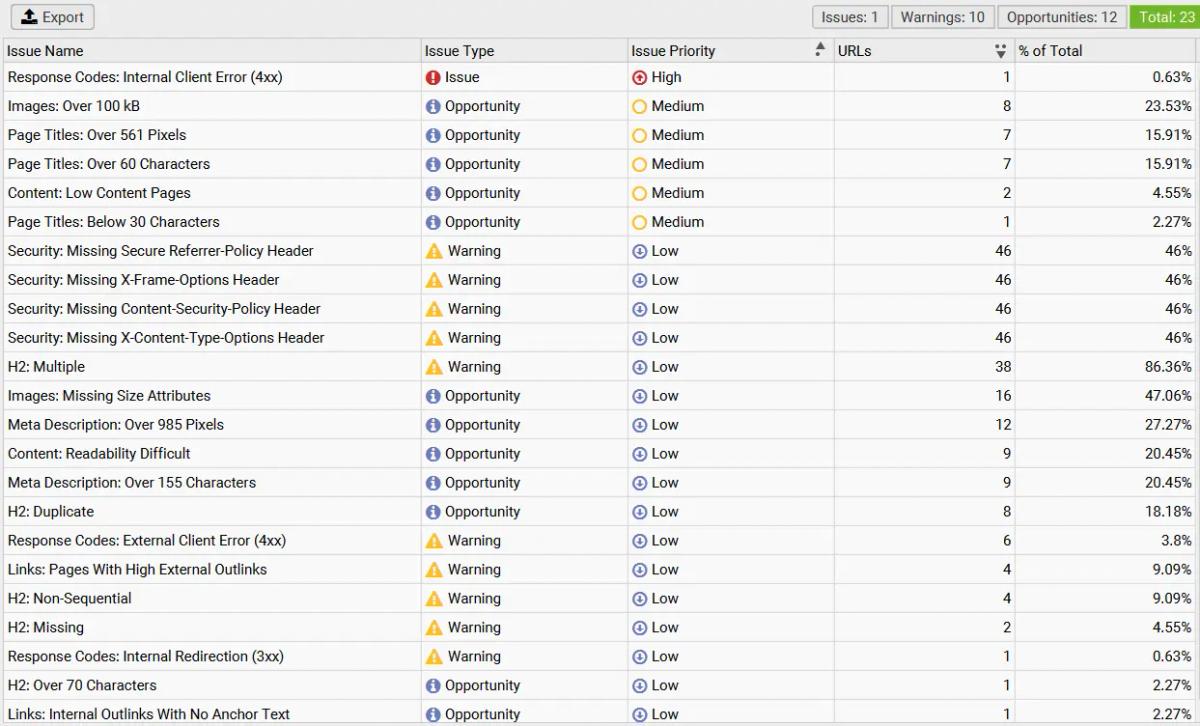
Technical SEO is the foundation. Even the best content doesn't earn you anything if crawlers can't reach it.
Start with a full crawl using Screaming Frog or Sitebulb. Then cross-check the results with the Pages report in Google Search Console and your XML sitemap. The crawl, index, and submitted numbers should roughly match. Large gaps indicate a problem.
First, check your robots.txt. SaaS sites often accidentally block important sections. A staging disallow rule that's never been removed. A docs-platform default set to noindex. A blanket /app/ disallow that also catches marketing pages that share the same URL path.
Extract your live robots.txt and verify each rule against your actual page template.
Find indexation gaps. Filter Search Console by the URL prefix of each page type. Flag any conversion pages that show "Crawled; not yet indexed." This status usually indicates thin content or a rendering problem. On a page lower in the funnel, this is a direct pipeline leak.
| Search Console Status | Possible reasons for SaaS sites | solve |
|---|---|---|
| Crawled, not yet indexed | Thin or templated content (common on auto-generated integration pages) | Add unique, basic content to every page |
| Searched, not yet indexed | Crawl budget gap or weak internal linking | Improve internal links from high-authority pages |
| Excluded from noindex tag | CMS or docs-platform is left active by default | Remove the noindex tag on the production route |
| Blocked by robots.txt | The huge disallow rule that catches marketing pages | Limit the scope of disallow to non-production paths only |
| Duplicate: Google chose a different canonical | Programmatic pages compete with nearly identical content | Set clear canonical or consolidate pages |
Check JavaScript rendering:
Many SaaS marketing pages share a JS framework with the product app. Open URL Inspection in Search Console, run a live test on your pricing page, and search the rendered HTML for your headline and pricing copy. If that content isn't there, Google is indexing an empty shell.
Push for server-side rendering on every page that touches revenue.
Check Core Web Vitals using field data: Sample at least one URL template for each page from the CrUX report. Your homepage is probably the fastest page on your site.
Your pricing page with its JS-rendered feature table and your heaviest comparison page are more likely to fail, and are where the buyer is most likely to actually end up.
When I did an audit, thanks to the SaaS plugin's organic pipeline, the site had traffic, but conversions were flat.
The root cause was technical: certain product pages were rendering content client-side, and Google was indexing the incomplete version. Fixing the rendering was the first domino to fall.
Step 2: Audit keyword targeting and cannibalisation
Crawlers can reach your pages, so the next question is whether those pages are on the right target.
Map each ranking page to a keyword and a funnel stage. Pull ranking data from Search Console and Semrush, then tag each page by intent: informational, commercial-investigative, or transactional.
This is where the most common SaaS failure lies:
Most SaaS content libraries are heavily skewed toward top-of-funnel educational posts. Meanwhile, commercial-intent pages- competitor comparisons, "Best X Software" roundups, pricing pages, and use-case pages- are either underdeveloped or missing altogether.
These are the pages that convert. If you don't have them, buyers will find that content on a competitor's site.
| Funnel Stage | buBuyer'sntention | Specific page types | Common Difference |
|---|---|---|---|
| Tofu | "I have a problem" | Blog posts, how-to guides | Content exists but never links to the product page |
| MOFU | "What options do I have?" | Comparison, Use-Case Page, Buyer's Guide | Completely missing or made without original feature details |
| BOFU | "Which one should I choose?" | Pricing, Demo Page, Alternative Page | Weak, templated, or poor CTA placement |
Find and fix keyword cannibalisation
This occurs when multiple pages compete for the same query. Instead of one strong page, you get three weak pages that divide the authority.
Spot it early: Open the Search Console Performance report, filter by query, and see how many of your URLs received impressions. If multiple pages appear, it means you've cannibalised.
There are three ways to do this: combine pages into one strong section, separate each page to target each from a different angle, or redirect weak pages to the strongest page.
Running cannibalisation analysis is becoming increasingly difficult
Intent mapping, keyword overlap detection, and fixing cannibalisation across dozens of SaaS pages deep experience. I've helped SaaS companies go from page 3-5 to page 1 by solving these very problems.
Step 3: Audit on-page SEO elements
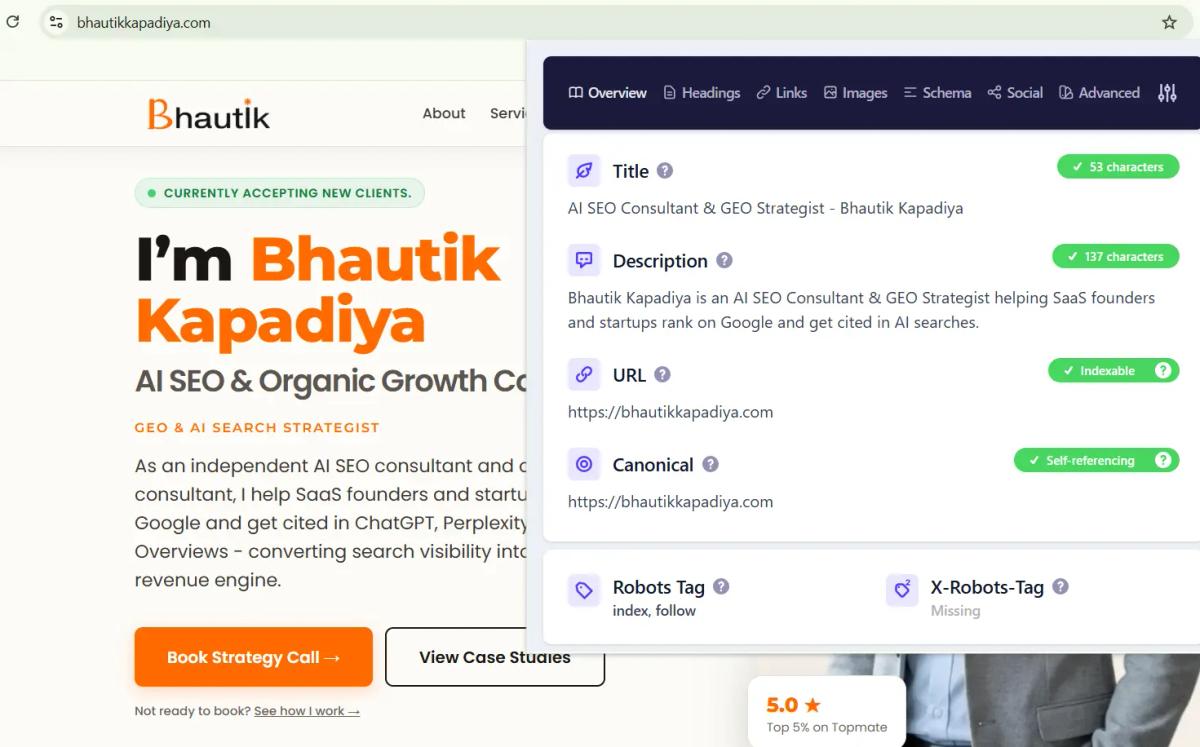
On-page optimisations are the bridge between targeting the right keywords and actually ranking for them. Work on these elements on your priority pages; start with bottom-of-funnel and mid-funnel pages, as they are closest to revenue.
| Element | What it's like to look good | Common SaaS Mistake |
|---|---|---|
| Title tag and meta description | Unique, intent-matched, keyword-bearing. BOFU titles written to earn clicks. | Templated titles duplicated on dozens of feature pages |
| Title structure | One H1 per page. Logical H2/H3 hierarchy. Headings were natural in the question format. | Multiple H1 tags, or keyword-filled headings |
| internal linking | High-traffic TOFU posts link to MOFU and BOFU pages | Educational posts that end without any next steps |
| Schema Markup | Articles, FAQ pages, software applications, breadcrumb lists | No structured data at all |
Internal linking needs more attention. When your most trafficked blog posts don't lead readers to comparison or conversion pages, the pipeline is silently leaking. No amount of extra content can fix a site where educational traffic has nowhere to go.
Check that each blog post in a topic cluster links to its parent service or product page. Check that comparison and alternative pages link directly to a demo or trial CTA. If your SEO audit strategy doesn’t include internal link mapping, you’re likely losing revenue.
Step 4: Conduct a content quality audit
A content audit assesses whether every page on your site deserves its place. Old thinking says to keep everything. This thinking works against you. Thin, outdated, and off-target pages reduce topical authority and waste crawl budget.
Create a content inventory: List each indexable URL with its target keywords, organic traffic, conversions or assisted conversions, backlinks, and last-updated date.
Then score each page on two axes: performance (does it drive traffic and contribute to conversions?) and strategic fit (does it speak to your real buyers and answer any real questions they have?).
Apply the four-action framework:
| action | When to use it | what it looks like |
|---|---|---|
| Keep | Great performer, right on target, accurate | Leave it. Check back next quarter. |
| Update | Low traffic, outdated data, or being stuck on page 2 for 12+ months | Refresh content, re-optimise, update publish date |
| Consolidated | Several thin posts on the same topic | Mix in a solid piece. Redirect the rest. |
| Removal | No traffic, no links, off target, no way to get value | Sort it out. Redirect or return a 410. |
Check EEAT signals: Look for authentic author bios with verifiable credentials. Look for first-hand experiences, original data, case studies with timelines, and operational insights that outsiders might not know. These signals now drive both Google rankings and AI citations.
Flag anything that hasn't been properly updated in 12 months. Both AI crawlers and Google reward freshness. A comparison page that mentions prices in 2023 tells both humans and machines that your content is outdated.
“His deep understanding of SEO has helped us achieve great results. His ability to think beyond conventional SEO tactics and implement innovative approaches has been invaluable to our success.”
Step 5: Audit AI Search Visibility (GEO + AEO)
This is a step that most SaaS audits still completely skip. And it's perhaps the most important step in 2026.
Traditional SEO gets you rankings. Answer Engine Optimisation (AEO) and Generative Engine Optimisation (GEO) only get you ranked among AI-generated answers. These are different goals, and they require their own audits.
The matter is simple. SparkToro's 2026 study with SimilarWeb found that 68% of Google searches in the US now end without a click, up from 58.5% in 2024. AI answer engines are changing the way buyers search, test, and select software.
A page can rank well in Google and be completely missing from ChatGPT or Perplexity. If your audit ignores AI search, it's auditing half the picture.
The AI search gap is real
Most SaaS sites score well on traditional SEO checks, but fall below 30% on GEO readiness metrics. This means that AI answer engines may not be able to cite your content, even if Google ranks it. This is the biggest untapped competitive advantage in SaaS SEO right now.
Step 5a: Check AI crawler access. Open your robots.txt and verify that GPTBot, ClaudeBot, PerplexityBot, and Google-Extended are not blocked. Security plugins and aggressive CDN bot filters often block these without anyone realising it.
Also, confirm that your revenue pages are rendered server-side; most AI crawlers don't reliably execute JavaScript.
Step 5b: Test your citation footprint. Make a list of the actual buyer prompts in your funnel. Run each one on ChatGPT, Perplexity, Gemini, and Google AI Overviews.
| Prompt Type | Example | What to record |
|---|---|---|
| Range Query | "Best [your category] Software 2026" | Is your brand visible? Which competitors are mentioned? |
| comparison query | “[Your product] vs. [competitor]” | Is the information accurate? What is presented in the best light? |
| Problem-related questions | "[How to solve the core problem with your product]" | What source domains does AI draw information from? |
| Brand Query | "What is [your product]?" | Is the answer correct and current? |
Step 5c: Score for content extraction. AI engines extract from content with a clear structure. Tables are extracted more reliably than prose. Stats with a cited source are quoted more often than unsourced claims. Concrete language is better than hedging. Current dates are better than old timestamps.
For more information on how to optimise for AI answer engines, I wrote a whole article. GEO Optimisation guide that covers platform-specific strategies for Perplexity, ChatGPT, and Google AI Overviews.
Want to know if AI search engines can find your SaaS?
I run dual-engine audits covering both Google rankings and AI citation visibility across ChatGPT, Perplexity, and AI Overviews. The audits identify what needs to be fixed so your brand is visible across both channels.
Step 6: Audit backlinks and off-page authority
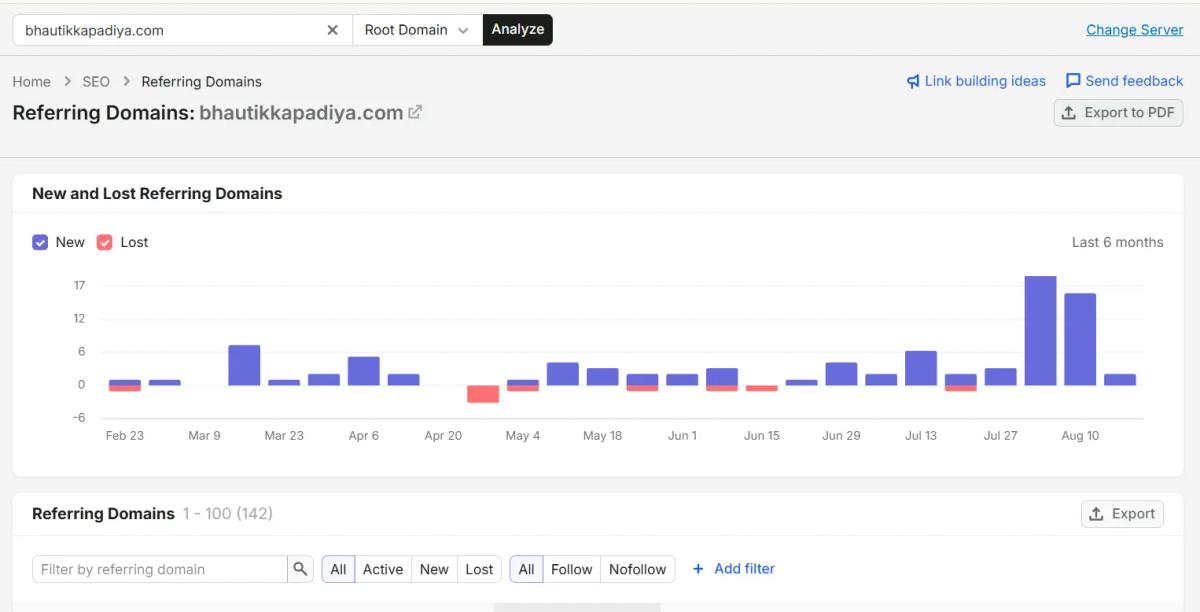
Off-page SEO includes everything outside of your own website that determines how search engines and AI tools evaluate your credibility. Keep this section focused. Authority matters, but it shouldn't overshadow the content and conversions.
Focus on link quality over quantity: Get your backlink profile from Ahrefs or Semrush. Links from trusted, relevant sites are valuable. A pile of low-quality directory links does almost nothing.
Look for broken backlinks pointing to dead URLs on your site; regain that lost authority with redirects.
Run a competitive link gap: Select two or three competitors ranking for your priority keywords. Run a link-intersect analysis.
This reveals domains that link to them but not to you- a ready-made outreach list of domains with a proven willingness to link in your space.
Check brand entity signals: Consistent information about who you are and what you do on your site, review platforms like G2 and Capterra, and third-party listicles help both Google and AI engines trust your brand.
Audit your About page for organisational schema. Look for unlinked brand mentions that you can convert into links.
Step 7: Audit the conversion path (from ranking to revenue)
Most SaaS SEO audits stop at ranking. This is the step where the audit either proves its value or quietly fails.
Open GA4 and look at the path from organic landing page to conversion. You're looking for a specific pattern: pages that are driving high traffic but generating low or no conversions. These are your weaknesses.
Check three things for each page type:
| Page Types | Expected CTA | common mistake |
|---|---|---|
| BOFU (Pricing, Demo, Trial) | Single clear primary CTA above the fold (book a demo, start a trial) | Too many competing CTAs dilute the call to action |
| MOFU (comparison, use-case) | Link deeper to the conversion page with contextual next steps | Dead-end pages with no internal links ahead |
| TOFU (Blog, Guide) | Low engagement CTAs (download, subscribe, explore product) | "Book Demo" on Educational Posts Where the Reader Isn't Ready |
Verify that your tracking actually works. Manually click on each primary CTA on your top 20 ranking pages. Redesigns, CMS migrations, and A/B test cleanups regularly uncover dead buttons or forms pointing to outdated endpoints. Then, confirm that the conversion event is firing correctly in GA4's DebugView.
Traffic without conversions is just a number
When I audited the organic pipeline of a SaaS plugin, the site had traffic but zero qualified signups. The solution wasn't more content; it was building internal link bridges between educational posts and product pages. Revenue-focused audits check this. Dashboard-focused audits don't.
How to prioritise your audit results
An audit that ends up as a document doesn't change anything. An audit that ends up as a prioritised backlog moves the pipeline forward.
Divide each search into three components: quick wins, structural improvements, and ongoing programs. Then rank based on proximity to revenue. An improvement to a BOFU conversion page is always better than a cosmetic change to a TOFU post.
| Priority | Example Search | Time | Specific owners |
|---|---|---|---|
| Critical (Fix this week) | BOFU page blocked with noindex tag | 1-3 days | Engineering |
| High (fix this month) | Keyword cannibalisation on a key commercial term | 1-2 weeks | SEO + Content |
| Medium (fix this quarter) | Combining five thin blog posts into one strong thing | 2-4 weeks | Material |
| Low (running) | Create backlinks to the Priority Cluster page | Continuous | SEO + Outreach |
Plan your work so that each phase helps launch the next:
First, fix technical crawl blockers. Then, strengthen high-intent content and conversion paths. After that, focus on AI search optimisation and authority building. Finally, focus on continuous measurement.
Check back at 30, 60, and 90 days. Compare this to the baseline you captured before you started. Track rankings, organic sessions by funnel stage, conversions, number of indexed pages, and your AI citation footprint.
Make audits a habit. Perform a full audit every three months. Between full passes, perform a monthly light check on core web vitals, crawl errors, and AI citations.
Get your first audit now for free
Use my interactive 42-point SEO audit checklist to identify technical, on-page, content, and geo-level issues in minutes. Created from real audits of 14+ client websites.
Conclusion
A proper SaaS SEO audit isn't a ranking checklist. It's a revenue diagnostic that runs across two search channels traditional and AI and follows the buyer from first impression to signed deal.
The seven steps in this guide cover the entire loop: technical health, keyword targeting, on-page elements, content quality, AI search visibility, backlink authority, and conversion paths. Leave any of these out, and you're looking at a half-baked picture.
An audit is only beneficial if the results lead to a prioritised plan involving demos and trials. If you need a SaaS SEO consultant to conduct this audit with you, I work directly with SaaS founders, no-account managers, no communication layers. Come visit. Talk about your organic pipeline